Skip to content

Field-service software for trades who work for themselves.

For field service businesses

Walk in already knowing what you did last time.

Every address keeps its own record: past visits, photos, what you fixed, what you charged. It all works with no signal, so it works in the basement too. Free Plan, no card needed, and it does not expire.

Platform
Android, iOS, web
Signal
Offline & online
Cost to start
Free, no card
Languages
15 supported

Sound familiar

Three ways the record goes missing

Your last visit to this house is somewhere in 400 photos.

You quoted it in a text, invoiced it on paper, and now you are chasing the balance.

The app died the second you walked down the basement stairs.

All three are the same problem: nothing is keeping the record.

How it works

Three steps, no learning curve

  1. Add the job

    Client, address, what is wrong. No setup, no training, no onboarding call.

  2. Work it

    Shoot photos, run the checklist, log what you did. Signal optional.

  3. Close it out

    Quote, invoice, get signed for, record the payment. The address keeps the record.

No signal

Built for the places where field work actually happens.

Zeus keeps a real database on your phone and treats the network as a bonus. In a basement, a crawlspace, a mechanical room or a rural driveway, everything you do is saved the moment you do it. Sync happens later, on its own. A change the server turns down, or one that clashes with an edit from another device, is kept and shown to you rather than dropped.

Local records
Stored on the device
Sync
Two-way and automatic
At rest
Device encryption, app sandbox
On interruption
Queued and retried
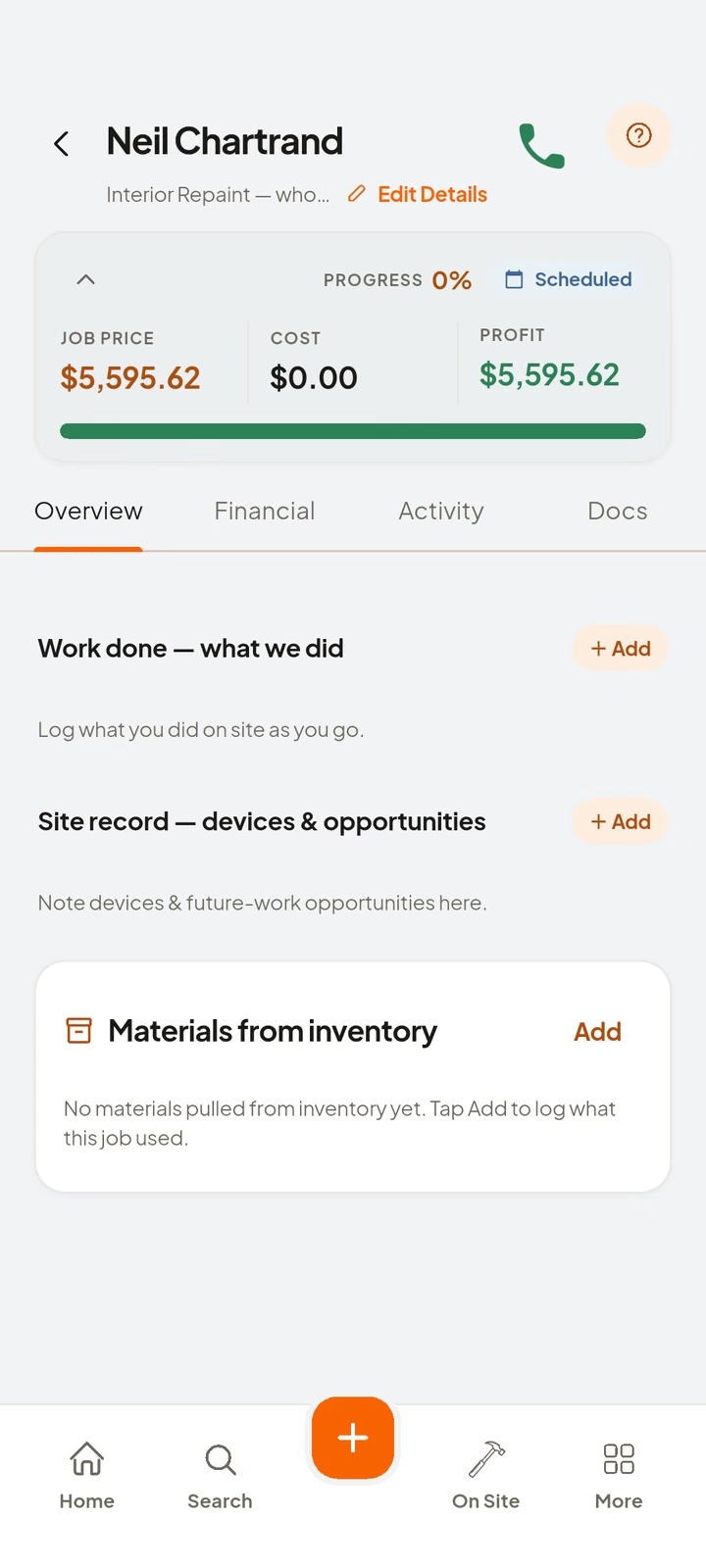
The on-site screen, showing the clock-in state for the current job.

One record per address

The address remembers, so you do not have to

Pull up the address before you knock and you already know what you fixed last time, what it cost, and what to watch for today.

Job site history

412 Maple Street

Water heater · 3 visits on file

  • 14 MAR 26Invoice 1043Paid
  • 14 MAR 26InspectionPass
  • 12 MAR 26Quote acceptedSigned
  • 02 NOV 25Service callDone
  • 18 APR 25InstallDone
You can open it in two taps, at the front door, with no signal.

What it does

Five things, in the order they matter

The record for each address comes first. Everything else exists to keep it accurate.

Every address has its own record

Walk in already knowing what you did last time.

Every address keeps its own record. Past visits, what you fixed, the photos, the quote, the invoice, what you charged, and what you noticed for next time. Six months later you open it in two taps instead of guessing.

No signal, no problem

Basements, mechanical rooms, jobs out of town: it keeps working.

The whole app works from a database on your own phone. You can create a job, take photos, run a checklist and log your work with no signal at all. When you get back to the truck it syncs on its own. Your work is saved on the phone before anything is sent over the internet.

Quote it, invoice it, get paid

Same job, three steps, no retyping.

Quote on site, turn it into an invoice when the work is done, take a deposit, and watch what is still owed. Every amount is counted in whole cents and every tax rate is stored exactly, so the totals are never a penny out. Zeus gives out quote and invoice numbers in order, with none missing, which is what your bookkeeper actually cares about.

Photos matched to the job

Stop scrolling 400 photos to find the right one.

Take the photo and Zeus matches it to the right job, using where you were standing. Then it asks you to confirm. Your camera roll stops being the filing system. Come back on a return visit and see exactly what that unit looked like last spring.

Signatures you can prove later

Months later, the signed record still shows what was agreed, without you having to explain it.

Get a signature at the truck, or send a one-time link and let them sign from the kitchen. Every signature is saved with a record of who signed, what they saw and when. If anyone changed that record, it would show. Anyone can open a public page and check the signature against it. This is the part that matters when someone says they never agreed to the extra work.

See the full feature list →

For your accountant

Export your books for the program your accountant uses

Quotes, invoices, payments, job costs, expenses and the tax totals: exported as files laid out for QuickBooks, Xero, Sage, Wave or FreshBooks, or as plain CSV and Excel.

  • QuickBooks OnlineCSV
  • QuickBooks DesktopIIF
  • XeroCSV
  • SageCSV
  • WaveCSV
  • FreshBooksCSV
  • ExcelXLSX

Each export is a file you download and hand over yourself, so your records stay in your hands.

Your trade

Built for the trades that keep going back

Pick yours: the free plan does not expire.

From the launch campaign

The short version, on a poster.

Posters for the app. They show the same product the rest of this site explains.

Campaign poster: a tradesperson photographing finished work, beside the headline "Photos Today. No Calls Later."
Campaign poster: a tradesperson arriving home at dusk, beside the headline "Home before the evening's gone."
Campaign poster: a tradesperson at a work van, beside the headline "Run Your Job. Get Paid."
Campaign poster: a messy paperwork desk, beside the headline "How Much Money Are You Losing Today?"
Campaign poster: a tradesperson checking a phone on site, beside the headline "Everything You Need. One App."
Campaign poster: a small-office scene, beside the headline "Small Invoices Are Still Real Money."
Campaign poster: coffee on a porch at sunrise, beside the headline "Know the day before it starts."
Campaign poster: an electrician at a panel, beside the headline "Every Job. Every Wire. All in One App."
Campaign poster: a crew on a large site, beside the headline "Big Jobs. Smooth Days."
Campaign poster: a workbench of loose receipts, beside the headline "Where your profit goes to hide."

Pricing

Plans

The Free Plan is not a trial. It does not expire. Quote and invoice as many jobs as you like, and the record is yours either way.

Save up to 25%

Free Plan

One seat

A real way to send quotes and invoices, and to keep the history of every job. Not a trial. It never runs out.

CAD 0forever

Nothing to pay laterFree stays CAD 0 for as long as you use it.

One seat, for one person. As many jobs, quotes and invoices as you like, and it never runs out.

No card needed, ever.

What you get

  • One seat, for one person
  • Unlimited jobs, quotes and invoices
  • Simple job scheduling
  • Client records and job history
  • Bring in the clients and team members from your phone contacts
  • Price Book
  • Inspections and checklists
  • Advanced calculators
  • Find suppliers near you
  • Signature collector
  • Payment scheduler
  • Use the app in your own language, not just English
  • Works with no signal
  • Download a copy of all your records

Limits on Free Plan

  • No job photos or documents
  • No project management
  • No way to add other people to the account
Most popular

Pro Plan

One seat

Everything Zeus does, for one person. Job photos and all the paperwork that goes with them.

Regular price CAD 39 a month

CAD 29.08a month

Paid once a yearThat is CAD 119 a year less than paying month by month.

One seat, for one person.

Every new account starts with a free 30-day trial. No card needed.

What you get

  • One seat, for one person
  • Everything in the Free Plan, plus:
  • Unlimited jobs, photos and documents
  • Photo organizer
  • Scan a receipt and it reads the numbers for you
  • Plan & Takeoff
  • Professional quotes and invoices
  • The full scheduler
  • Day Board
  • Complete client and job history
  • Inventory
  • Showroom
  • Opportunity Finder
  • Job Cost & Company Expenses
  • Clock in/out with GPS
  • Subcontractor records
  • Business reports
  • Your job photos backed up off your phone

Crew Plan

5 seats included

One place for a small team. Everyone gets their own seat and their own login, and you choose what each person can see.

Regular price CAD 99 a month

CAD 79.08a month

Paid once a yearThat is CAD 239 a year less than paying month by month.

5 seats, one for each person.

Every new account starts with a free 30-day trial. No card needed.

What you get

  • Up to five seats: one seat for each person
  • Everything in the Pro Plan, and you choose what each team member can see
  • Shared team schedule
  • Work Board
  • Dispatch Board
  • Crews, sent to a job in one action
  • Time off, on the team schedule
  • Team member roles and permissions
  • Employee time tracking
  • Crew checklists
  • Shared job notes and photos
  • See what everyone on the team has done

We show you every plan and every limit before you sign up. See what each plan includes.

Questions

What businesses ask first

Does it really work with no signal?

Yes. That is the whole reason we built it. The app keeps your records on the phone itself. You can create a job, take photos, run a checklist and log your work straight away, with no bars at all. When you get a signal again it sends everything on its own, in the background. If that fails it waits and tries again. Your work is saved the moment you write it down.

Which phones does it run on?

Android and iPhone, from Google Play and the App Store. You can also open Zeus on a PC or Mac in any modern browser at app.fieldzeus.com, with the same account and the same data and nothing to install. The download page has all three.

Is the Free Plan actually free?

Yes, and it never runs out. You get one seat for one person, and as many jobs, quotes and invoices as you like. It also gives you scheduling, client records and job history, the Price Book, inspections, and a download of your records for your accountant. No card needed. It is a real way to work, not a clock counting down.

What is the free trial then?

It is a free try of the paid product, and it is a different thing from the Free Plan. Every new account gets it. No card needed. It runs for thirty days from the day you start it. When it ends you choose. You can stay on the Free Plan and keep sending quotes and invoices on as many jobs as you like, or you can move to the Pro Plan or the Crew Plan. Either way you keep everything you have already put in.

What is the difference between the Pro Plan and the Crew Plan?

The difference is how many people can use it. The Pro Plan is for one person: CAD 39 a month, or CAD 349 for a whole year. The Crew Plan is the same app for a team, and it comes in four sizes: five seats for CAD 99 a month, ten seats for CAD 173.99, fifteen seats for CAD 249, and unlimited seats for CAD 349. On the Crew Plan each person gets their own seat and their own login, and you choose what each one can see. The Crew Plan also gives you the shared team schedule, the Dispatch Board and time tracking. The five-seat size can be paid for a whole year at once, at CAD 949. On the bigger sizes, paying for a year is by arrangement.

What happens when the introductory price ends?

You start paying the normal price for the size you are on: CAD 39 a month for the Pro Plan, or CAD 99, CAD 173.99, CAD 249 or CAD 349 a month for the Crew Plan. It covers your first three months of paying, and only if you pay month by month. If you pay for a whole year at once you pay the normal price from the start.

Read all 20 answers →

Your next job happens whether the record exists or not.

The Free Plan is not a trial and it does not expire. The Pro Plan adds job photos, documents and recording payments.

Free Plan, no card needed, and it never runs out.

Scan to open the download page on your phone.